CI/CD Github Action
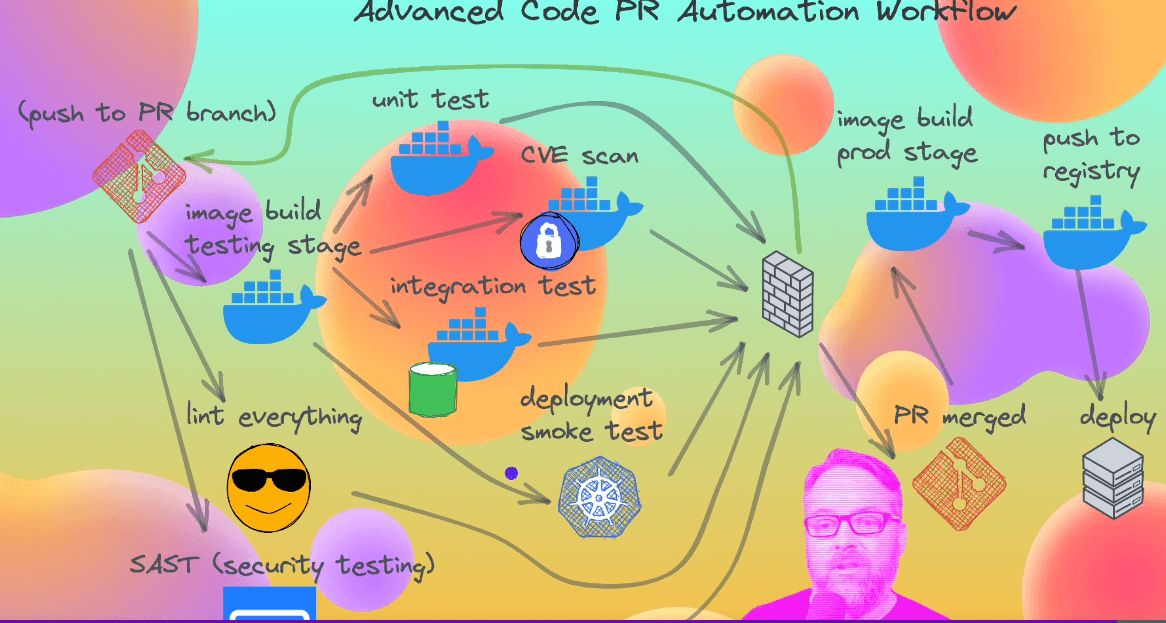
By integrating CVE scanning into your GitHub Actions workflows, you can automatically check your code for security issues and take appropriate actions, such as failing the build or sending notifications, if vulnerabilities are detected. This helps ensure that your software remains secure and reduces the risk of potential exploits.
Smoke Testing :
- If your application is a single containerized application and you only need to perform smoke tests on that specific container, Docker can be a suitable choice. Docker provides a simpler setup and is focused on containerization and running containers on a single machine.
- If your application consists of multiple services that need to be tested together, require scaling and orchestration, or have more complex deployment requirements, Kubernetes is a more appropriate choice. Kubernetes can manage the deployment of your application across multiple machines, handle service discovery, and provide scalability and fault tolerance.
Ultimately, the decision depends on the complexity and requirements of your application. In some cases, you might even use both Docker and Kubernetes in combination, where Docker is used for local testing and Kubernetes is used for production deployment and testing.
Docker Security
Control groups : give only specific ram speed to container (by default everything access to container)
https://github.com/docker/docker-bench-security (opens in a new tab)
Repo to run in host machine to check all things perfectly configure in that machine for docker.
Trivy and Micro Scanner are effective tools for identifying vulnerabilities, misconfigurations, and exposed secrets. However, it is important to note that finding vulnerabilities is not a common occurrence. Therefore, it is advisable to consult with the security team to determine the severity of any potential risks before proceeding with container production.
https://github.com/BretFisher/nodejs-rocks-in-docker (opens in a new tab)